Total Recall
How I gave my agents a memory that survives the session, using a folder of Markdown files and about fifteen minutes.
Every time you start a new Claude Code session, your agent knows nothing about you.
Not your name. Not your projects. Not your expertise. Not the decisions you made yesterday, the architecture you chose last week, or the 40 notes you've accumulated about your work. Every session is a blank slate. You brief the agent, it helps you, the session ends, and everything evaporates.
You have your memory. The agent has amnesia.
I got tired of being the only one who remembers.
The Gap Between Heavy and Nothing
The agent memory problem isn't new. People are throwing serious engineering at it, RAG pipelines, vector databases, cloud-hosted memory layers, graph stores. Microsoft, Google, and a dozen startups are building robust, enterprise-grade solutions for persistent agent context.
They work. They're also heavy. Standing up a RAG pipeline with a vector DB, an ingestion layer, a retrieval service, and a cloud dependency is real infrastructure. For a team or a product, that investment makes sense. For an individual who wants their AI agent to remember who they are and what they're working on? It's a sledgehammer for a nail.
On the other end, the consumer AI apps, ChatGPT, Claude, do have built-in memory. They'll note that you like concise answers or that you work in cybersecurity. But this memory is shallow. It captures your preferences. It does not capture what you know. It knows you're into security; it doesn't know the 14 lessons you've learned from three years of investing in real estate, or the voice patterns you've developed across 50 LinkedIn posts, or the design doc for the game you're building. It stores notes about you. It doesn't store your actual brain.
And here's the part that should bother you: you don't control it. You don't see what's in there. You can't edit it deliberately. You can't export it, version it, or hand it to a different agent. Your context is trapped inside one vendor's black box.
What if the solution was simpler?
Onboarding-as-Code
The idea: instead of briefing your agent every session, you maintain a set of persistent files that agents auto-read at startup.
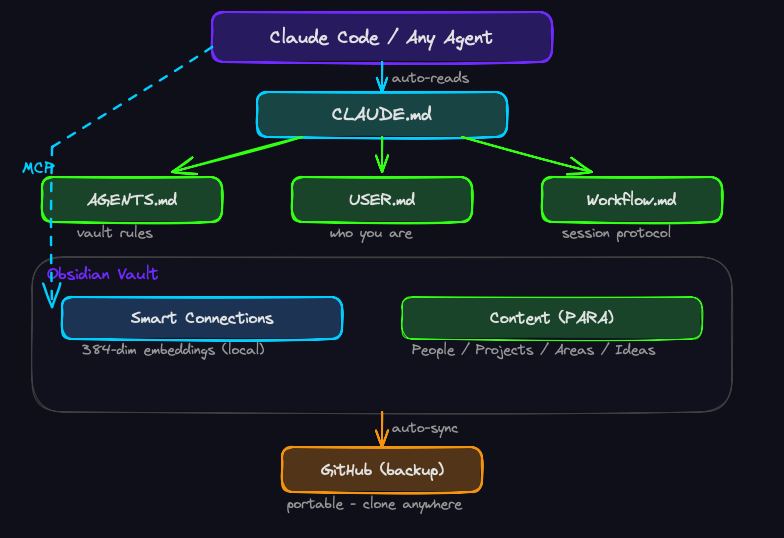
The vault is an Obsidian folder, plain Markdown files on your local machine. The agent reads them through the filesystem. Semantic search is handled by an embeddings plugin exposed through an MCP server. Nothing leaves your machine. No API keys for the memory layer. No cloud dependency. You can open every file in a text editor and read exactly what your agent knows.
Here's what each layer does.
Layer 1: The Bootstrap, CLAUDE.md
Claude Code auto-reads any CLAUDE.md in the working directory at session start. This is the bootstrap, the first thing the agent sees, before you say a word.
Mine points to three files:
## First steps for every session

1. Read AGENTS.md, vault structure, rules
2. Read USER.md, who I am, my expertise
3. Read Workflow.md, session protocol
4. Wait for my scope statement
Four lines that turn a blank-slate session into a context-aware one. The agent reads the bootstrap, follows the pointers, and within 10 seconds it knows how the vault works, who you are, and how you like to work.
The key insight: CLAUDE.md doesn't hold the context. It holds the pointers to the context. You can update USER.md or AGENTS.md independently without touching the bootstrap. Separation of concerns, applied to agent onboarding.
Layer 2: The Vault's Operating Manual, AGENTS.md
This is the longest onboarding file, and the most load-bearing. It tells any agent, not just Claude, how the vault is organized and how to work with it correctly.
What's in it:
- Folder map, where things live (PARA structure: Projects, Areas, Resources, Archive, plus People, Ideas, Inbox, System)
- Templates, how to create notes correctly (7 templates: Person, Project, Idea, Area, Resource, Meeting, Daily Note)
- Naming conventions,
Firstname Lastname.mdfor people,Short Title.mdfor projects,YYYY-MM-DD.mdfor daily notes - Status vocabulary, the exact allowed values for the
status:field (todo,active,paused,done,dropped) - Tag conventions, canonical tags, no synonyms, lowercase-only rule
- Hard rules, what agents must never do (don't invent statuses, don't edit templates, don't auto-archive, don't paste raw migrations)
The effect: any agent reading AGENTS.md can create a new note, file it correctly, tag it with the right conventions, and link it to related notes, without asking you how your vault works. The manual IS the onboarding.
Layer 3: The Identity File, USER.md
This is where it gets personal. USER.md tells the agent who it's talking to:
- Identity, name, role, background
- Domains and expertise, what you know deeply vs. what you're learning, with calibrated treatment per domain
- Communication preferences, tone, verbosity, humor, language
- Working style, how much pushback you want, how much initiative agents should take
- Things to avoid, pet peeves and dead-end patterns
- Operating context, timezone, tools, environment
Here's what makes this different from what ChatGPT or Claude save about you behind the scenes: you see everything. You wrote it. You control it. You can open the file, read every line, edit anything, delete anything. When an agent learns something new about you in conversation, it doesn't silently update a hidden profile, it surfaces the fact and asks: "Want me to add this to USER.md?" You decide.
The update policy is strict: agents read USER.md but never write to it without explicit instruction. This prevents drift from agent assumptions accumulating unchecked in a file you trust.
This isn't just a feature. It's a philosophy. Your identity file should be as transparent and deliberate as your code. You wouldn't accept a CI pipeline that mutates your config without telling you. Don't accept an AI that mutates your profile without asking.
Layer 4: The Session Protocol, Workflow.md
This file encodes the mental model that makes everything else work:
The vault is persistent state. Sessions are ephemeral workspaces. Agents are stateless workers.
Same architecture as a database + workers. The vault holds long-term truth. Sessions load what they need, do focused work, write important things back, and end. The next session starts fresh and pulls fresh context.
The operational rules that fall out of this:
- One session per focused work block. Topic switches = session boundaries.
- Begin every session with a scope statement. "Today we're working on the workshop deck." One sentence that tells the agent what to load and what to ignore.
- End sessions by writing back. Anything learned or decided goes into the vault before closing.
- Parallel sessions for parallel work. Two terminals, two topics, no context bleed.
That third rule is the one that matters most:
This session's job is to leave the vault smarter than it found it.
Every conversation either deposits knowledge into the vault or it doesn't. The ones that do compound. The ones that don't evaporate. Over weeks and months, the difference between a vault that grows after every session and one that sits static is the difference between a second brain and a folder of notes.
Layer 5: Semantic Memory, Smart Connections + MCP
The four files above give agents structure. Semantic search gives them recall.
Smart Connections is an Obsidian plugin that creates embeddings of your notes, 384-dimensional vectors that encode the meaning of each text block. The default model runs entirely on your machine. No API, no data leaving your laptop, no cost.
What's an embedding? Take a block of text. Run it through a small neural network. Get back an array of 384 numbers. Those numbers represent what the text means, the concepts rather than the specific words. Two blocks about similar topics will have similar numbers. Two blocks about unrelated topics won't.
The embeddings are exposed to external agents through a community-built MCP server:
npm install -g @gogogadgetbytes/smart-connections-mcp

claude mcp add smart-connections \
  -s user \
  -e VAULT_PATH="/path/to/your/vault" \
  -- smart-connections-mcp
Now when an agent needs to find something in your vault, it doesn't grep for keywords. It searches by meaning. "Find notes about lessons I learned from past projects" returns results that are conceptually related, even if they don't contain the word "lessons" or "projects."
The search protocol I settled on: semantic search by default, keyword grep only as fallback when results are thin or you need exact string matches. Running both every time defeats the purpose of having embeddings.
Why Not a Graph Database?
If you've looked at other memory architectures for agents, you've probably seen GraphDB-based approaches, knowledge graphs that model relationships between entities explicitly. They're powerful. They're also another piece of infrastructure to stand up, maintain, and keep in sync.
Obsidian gives you graph capabilities out of the box. Every [[wikilink]] is an edge in a graph. Every note is a node. The Obsidian graph view visualizes the relationships live. Combined with semantic embeddings for meaning-based search, you get both structural relationships (links) and semantic relationships (embeddings), without installing a database.
Is this as powerful as a dedicated GraphDB? No. Is it powerful enough for a personal second brain? Absolutely. And it's zero infrastructure. The graph is just a byproduct of how you write notes. That's the kind of trade-off a lightweight system should be making.
Layer 6: Portable Backup, GitHub
The vault syncs to a private GitHub repo via the Obsidian Git plugin. Auto-commit every 10 minutes, auto-push after commit, auto-pull on startup.
This does more than prevent data loss. It makes the entire brain portable.
Clone the repo on a new machine. Open it in Obsidian. Point Claude Code at it. Within 60 seconds, any agent on any device has your full context, your identity, your projects, your lessons, your conventions, your search index. The brain travels with you.
If you've seen Altered Carbon, you know the concept: the characters back up their consciousness to a portable device called a stack. If the body dies, the stack survives. The memories, the personality, the knowledge, all intact, ready to be spun up in a new host.
This is the low-budget version of that. Your vault is the stack. GitHub is the backup facility. The agent is the sleeve. The knowledge survives every session, every machine, every tool. It's yours, it's portable, and it persists.
What This Actually Looks Like
Here's a real session. I open a terminal in my vault directory and launch Claude Code:
cd ~/my-vault
claude
The agent auto-reads CLAUDE.md. Within seconds it's loaded AGENTS.md, USER.md, and Workflow.md. It knows the vault structure, how I communicate, and the session protocol.
I type:
"Today we're working on my woodworking project. I want to document the bookshelf I finished last weekend."
The agent searches the vault semantically, finds my existing Woodworking area note with accumulated techniques and tool preferences, and starts an interview, asking me the right questions about the build. When we're done, it creates a properly-structured project note with frontmatter, tags, wikilinks to related notes, and lessons cross-linked back to the area hub.
I didn't explain how the vault works. I didn't specify the template format. I didn't tell it which tags to use. The onboarding files handled all of that. I just said what I wanted to work on.
Where To Go From Here
The architecture I've described is a foundation. Here are two ways to extend it that I think matter most:
Complete the picture with agent skills
The vault gives your agent knowledge, who you are, what you're working on, what you've learned. But knowledge without capability is a library with no librarian.
If your work involves software development, add development-focused skills to your Claude Code setup. If you're doing data analysis, add those. If you're writing content, add writing and research skills. The vault handles what the agent knows; skills handle what the agent can do.
For every area and project in your vault, ask: does my agent have the right skills for this domain? If not, the agent has the context but lacks the tools to act on it. That's like knowing what you want to build but not having the right power tools. The knowledge is there. The skills complete the circuit.
Let the vault teach you what it knows
As your vault grows, patterns emerge that you didn't plan for. Notes cluster in unexpected ways. Semantic search surfaces connections you didn't draw explicitly. Areas that started as "curious hobbyist" gradually accumulate enough lessons and projects to graduate into something more.
The vault isn't just a place to store what you know. It's a mirror that shows you what you're becoming. Pay attention to where the density is growing. That's signal.
Get Started
The full vault template, with all onboarding files, folder structure, templates, conventions, and setup guide, is open source:
github.com/LikelyMalware/obsidian-agent-brain
Clone it. Open it in Obsidian. Install Smart Connections + the MCP server. Fill in USER.md with your own information. Launch Claude Code from the vault directory.
15 minutes from clone to a working agent brain.
The Portable Thought
Your agents are only as good as the memory you give them.
Right now, most people are using AI agents as sophisticated one-shot tools, powerful in the moment, amnesiatic by design. The session ends and the context dies. That's not how you'd onboard a human colleague, and it shouldn't be how you onboard an AI one.
The architecture here is simple. It's local. It's free. It's a folder of Markdown files with a naming convention and a semantic search layer. There's no framework to install, no SaaS to subscribe to, no vendor to trust with your data.
What makes it work isn't the technology. It's the decision to treat agent context as infrastructure, something you build once, maintain deliberately, and compound over time.
Give your agents a brain. They'll return the favor.
LikelyMalware writes about AI agents, threat intelligence, and the stuff that breaks when you combine the two. Follow on X and LinkedIn.